Posts

Showing posts with the label Class Work

Week 6 UV Mapping Continued

Image
Week 6: Today we continued to practice UV ampping by using one of the 3D models we made. We used the Storm Trooper model as everyone had made this one aside from the people (me) who made the Darth Vader but they both have ver similar geometry so this didn't really effect the creation of the storm trooper model. I used a plane which the net of the model on it to figure out the sizing of model and placed it all together, i then used UV Mapping to texture the object, I did this quite quickly as I am getting used to UV mapping so it took my no longer than 20 minutes  (as I am writing this I have just noticed an error in the side view tab but that is easily fixed).   I then imported the Storm Trooper into sketchup so I can geolocated it, I struggled at first as the texts wasn't showing up however I quickly realised the issue as the files were not all in the same folder and when I moved all files into the right file location it imported correctly.    I then geolocated...

Week 5

Image
WEEK 5- UV MAPPING   Today we learnt a range of lechniques within 3DS Max such as the Boolean tool aswell as how to texture map  to learn how to texture map we started off with a simple cube and started to apply textures to it using the following file: At first we just simply applied the texture using the material manager which didnt really seem to work so we had to use the unwrapuvw modifier to control where each section of the die was going. we used the UVW editior to control exactly where the map was going we had to do this for each polygon which could be quite time consuming if the shape had a lot of polygons.  one of the issues that i faced within the UVW editor was that the texture didn't 'snap' to a point so it was quite difficult to get 100% accuracy when moving the map around.      The finished die:   We then got taught how to use the Boolean tool, which simply aids th eformation of compound shapes and allows you to form unique effects qu...

Week 4

Image
 Week 4:  To start off with working within 3DS Max we first experiemnted with the shapes available within the program and created a series of random forms to see what we could use to create our 3d forms this is what i created: Speed Modelling  This week we experiemnted and learned how to use 3DS max through the creating a series of speed models that Jared gave to us.  we started by modelling a full english breakfast in 20 minutes:    As a first attempt in 3ds Max, I really quite enjoyed creating it, I found it a lot more efficient compared to sketup andfound that it had a lot more features to make 3D modelling simpler that sketchup.    Within 3ds max i really like the option of the different viewports and this makes spline modelling a lot easier than in sketchup as you know which axis you are working on at all times, I did try to use spline modelling in this speed model but i didnt feel comfortable with it yet so i decided to delete it and do the ...

SketchUp Practice

Image
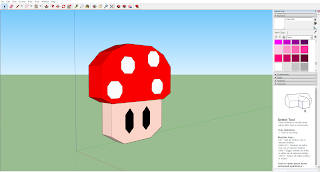
  Sketchup Practice To practice sketchup and the geolocation method I created a low poly Super Mario mushroom and placed it at  the marounuchi gate in Tokyo, Japan. I used tokyo as the location as the Nintendo headquarters are in Tokyo, i tried to place it infront of the headquarters but the area was too built up and the model could barely be seen amongst all the buildings and trees.  During my experimentation within sketchup I found it to be quite a tempermental program and i was finding that It was taking quite a long time to do simple things such as mirroring a spline structure. I found that sketchup seems to be lacking a lot of features that improve effieciency within 3D modelling.  Sketchup for me, seems like a good  software to used for simple, square structures that dont require many circular or spherical objects or simple, low poly objects like the mushroom I made above . Another issue for me is that very often it is quite unclear what axis you are drawi...